Public DNS Comparison: Which Resolver Should You Choose?
 Marek Dvořák
November 1, 2026
Marek Dvořák
November 1, 2026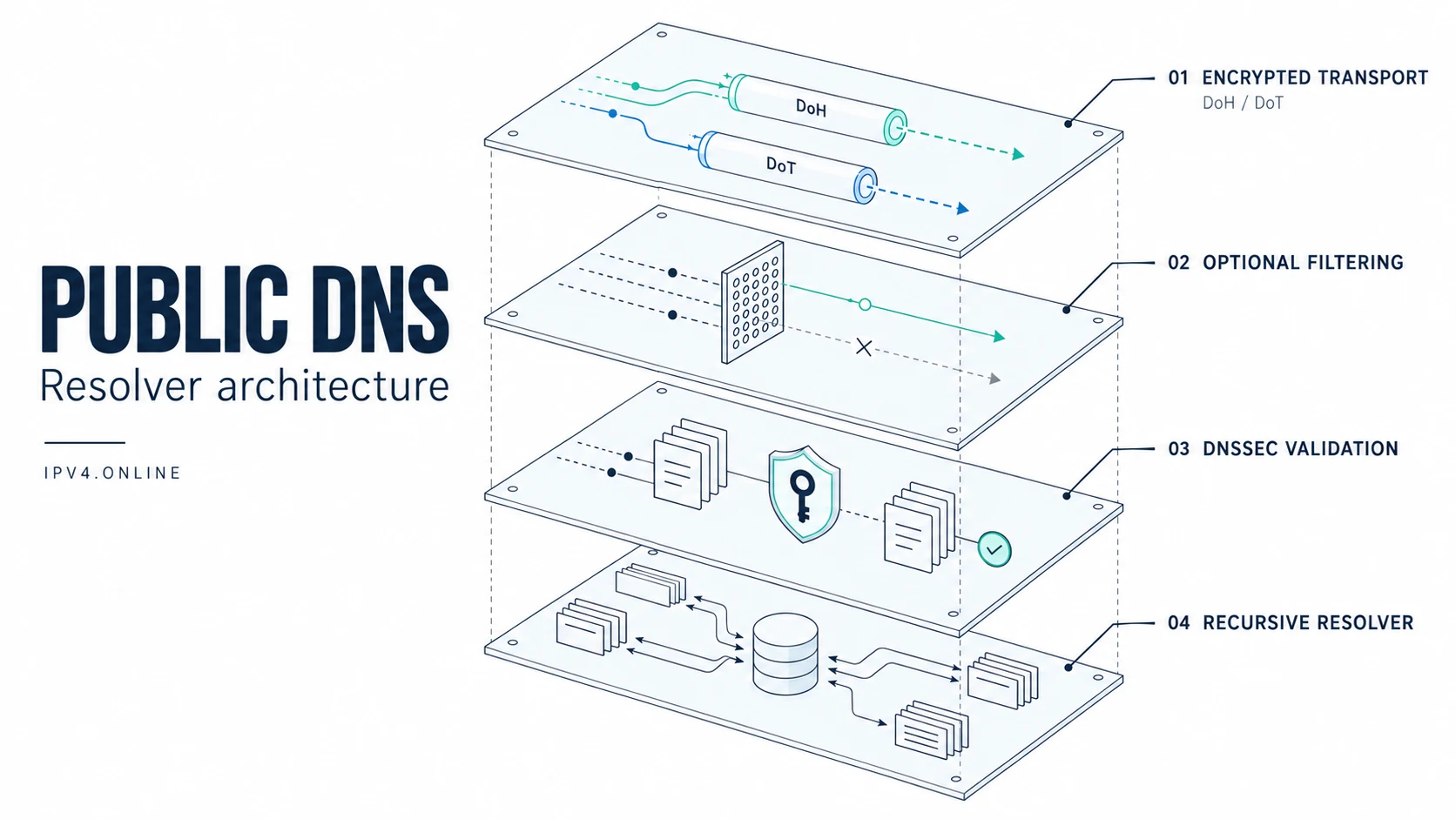
Choose a public DNS resolver by its filtering policy first, then enable an encrypted connection and test it on your network. This public DNS comparison covers Quad9, Cloudflare, OpenDNS, AdGuard DNS, Google Public DNS and CleanBrowsing. They serve different needs: blocking malicious domains, reducing ads and tracking, restricting adult content, or resolving names without category filtering.
The important detail is the specific service address. Two addresses from the same provider can apply different policies. A green checkmark for encryption also tells you little about whether your device actually uses it.
Provider documentation checked on November 1, 2026. This is a comparison of documented features, not a measured performance ranking. Addresses and service policies can change.
Six DNS Providers Compared: Features and IPv4 Addresses
The table compares the named public profiles. Paid dashboards, enterprise agents and custom policies are outside its scope. The two IPv4 addresses in each row belong to the same profile.
| Provider and profile | IPv4 addresses | Filtering | DoH | DoT | DNSCrypt | DNSSEC validation |
|---|---|---|---|---|---|---|
| Quad9 Secure | 9.9.9.9, 149.112.112.112 | Malicious domains | Yes | Yes | Yes | Yes |
| Cloudflare standard | 1.1.1.1, 1.0.0.1 | No category filtering | Yes | Yes | Not offered | Yes |
| OpenDNS Home | 208.67.222.222, 208.67.220.220 | Phishing protection; configurable categories with a Home account | Yes | Yes | Yes | See note below |
| AdGuard DNS Default | 94.140.14.14, 94.140.15.15 | Ads and trackers | Yes | Yes | Yes | Yes |
| Google Public DNS | 8.8.8.8, 8.8.4.4 | No category filtering | Yes | Yes | Not offered | Yes |
| CleanBrowsing Family | 185.228.168.168, 185.228.169.168 | Adult, malicious, proxy/VPN and mixed-content domains; SafeSearch | Yes | Yes | Yes | Yes |
Read the protocol columns as available connection methods. Enable the chosen transport in your client and use the endpoint for your filtering profile. Cisco provides separate OpenDNS DoH and DoT configuration details.
DNSSEC needs a qualification for filtering services. Cisco documents DNSSEC validation failures in Umbrella’s resolver responses. That does not establish identical behaviour for every consumer profile and account policy. Verify the OpenDNS endpoint you deploy using the checks below.
Choose the policy before choosing the provider
Threat blocking without family restrictions: Quad9
Quad9 Secure is a practical starting point when you want known malicious domains blocked without adding an adult-content policy. Use the .9 pair from the table.
Its other profiles solve different problems:
9.9.9.10and149.112.112.10: no threat blocking and no EDNS Client Subnet (ECS).9.9.9.11and149.112.112.11: threat blocking with ECS. ECS sends a portion of the client’s network address upstream to help services select a nearby content server. Consider it when CDN selection is a demonstrated problem.
Do not configure .9 and .10 as interchangeable primary and secondary servers: the second address removes the blocking policy. Each profile also has its own encrypted endpoints.
There is also a recent change worth checking against old screenshots: from June 15, 2026, all Quad9 endpoints validate DNSSEC, including .10 and .12. Quad9’s change announcement supersedes older instructions that describe .10 as a non-validating diagnostic resolver.
General resolution without category filters: Cloudflare or Google
Cloudflare’s standard pair and Google Public DNS are useful candidates when you want general resolution without malware, advertising or adult-content categories. Choose between them using local reliability, privacy requirements and application behaviour.
Cloudflare also offers separate filtered profiles:
- Malware blocking:
1.1.1.2and1.0.0.2. - Malware and adult-content blocking:
1.1.1.3and1.0.0.3.
These are different services from 1.1.1.1. Cloudflare provides profile-specific encrypted hostnames and test domains.
Google’s public service does not provide an equivalent selectable family or ad-blocking profile. Neither standard resolver should be treated as a substitute for a filtering service when blocking is your goal.
Ads and trackers across devices: AdGuard DNS
AdGuard’s default public pair blocks advertising and tracking domains. It is useful for devices where installing a browser extension is inconvenient.
Two alternatives are available:
- Non-filtering:
94.140.14.140and94.140.14.141. - Family protection:
94.140.14.15and94.140.15.16, adding adult-content restrictions and SafeSearch where supported.
DNS filtering acts on domain names. It cannot selectively remove an advertisement served from the same hostname as the content you want, and it does not remove empty ad spaces from a page. Treat it as one layer of protection. AdGuard’s DNS filtering explanation describes these limits.
Family restrictions: CleanBrowsing or OpenDNS FamilyShield
CleanBrowsing has three preset public policies:
- Family: the pair in the table; also restricts proxy/VPN and mixed-content domains.
- Adult:
185.228.168.10and185.228.169.11; allows mixed-content sites and proxy/VPN domains while blocking adult and malicious domains. - Security:
185.228.168.9and185.228.169.9; blocks malicious domains without adult-content restrictions.
The Family profile is stricter than its name alone suggests. Test ordinary services your household uses before applying it everywhere. CleanBrowsing positions its free filters for home use, with throttling and no support. An organisational deployment may require a paid plan.
OpenDNS FamilyShield uses 208.67.222.123 and 208.67.220.123 for predefined adult-content filtering. These differ from OpenDNS Home’s .222 and .220 addresses. Cisco’s FamilyShield guide also explains how alternative DNS settings or a VPN can bypass it.
If you need customised categories, review OpenDNS Home’s account-based configuration. A preset public resolver and a managed filtering account provide different levels of control.
DoH, DoT, DNSCrypt and DNSSEC protect different things
DoH, DoT and DNSCrypt encrypt the connection between a client and a resolver. They reduce exposure of DNS queries to observers along that connection. The resolver still receives the queries, so its privacy policy matters.
| Feature | What it does | What to configure |
|---|---|---|
| DNS over HTTPS (DoH) | Carries DNS inside HTTPS, normally on port 443 | An HTTPS endpoint in a compatible browser, OS or forwarder |
| DNS over TLS (DoT) | Carries DNS inside TLS, normally on port 853 | A resolver hostname and certificate validation |
| DNSCrypt | Authenticates and encrypts client-to-resolver DNS traffic | A compatible client and current provider configuration or stamp |
| DNSSEC | Validates signed DNS data through a chain of trust | A validating resolver, with validation enabled |
DNSSEC does not encrypt queries or decide whether a website is safe. A malicious domain can have valid signatures. An unsigned domain can resolve successfully through a validating resolver. Filtering, validation and transport encryption each address a different part of the problem.
Encrypted DNS also does not hide your public IP from websites or encrypt the rest of an application’s traffic. When choosing a provider, consider what query data it retains, how long it keeps that data and whether the policy fits your requirements.
Configure encrypted DNS with the matching endpoint
These endpoints match the six profiles in the first table. A DoT hostname is entered without https:// or a path; a DoH configuration uses the complete URL.
| Profile | DoT hostname | DoH URL |
|---|---|---|
| Quad9 Secure | dns.quad9.net | https://dns.quad9.net/dns-query |
| Cloudflare standard | one.one.one.one | https://cloudflare-dns.com/dns-query |
| OpenDNS Home | dns.opendns.com | https://dns.opendns.com/dns-query |
| AdGuard Default | dns.adguard-dns.com | https://dns.adguard-dns.com/dns-query |
| Google Public DNS | dns.google | https://dns.google/dns-query |
| CleanBrowsing Family | family-filter-dns.cleanbrowsing.org | https://doh.cleanbrowsing.org/doh/family-filter/ |
For Cloudflare’s filtered profiles, use security.cloudflare-dns.com or family.cloudflare-dns.com for DoT, and the corresponding https://HOSTNAME/dns-query URL for DoH. Using the standard endpoint would remove the filtering you selected.
Make the change on one device first
- Record the current configuration, including whether DNS is automatic. Keep a rollback path.
- Select one profile. For plain DNS, enter both addresses belonging to it. For encrypted DNS, select its matching hostname or URL.
- Enable encryption explicitly. On Android 9 and later, the Private DNS provider hostname setting uses DoT; manufacturer’s menu names vary. On other systems, follow the provider’s OS-specific guide.
- Check competing settings. Browser Secure DNS, VPN clients and managed-device policies may select another resolver. Align them with the intended policy.
- Check IPv6 too. If your network advertises IPv6 DNS servers, configure the matching provider profile there as well. Do not disable IPv6 just to avoid configuring it.
- Test normal browsing, filtering and encryption separately, then extend the change to the router or other devices.
Entering an address in a router’s ordinary DNS fields usually selects plain DNS. Router support for forwarding over DoH or DoT is a separate feature. If the router encrypts only its upstream connection, the device-to-router leg can still use plain DNS.
Verify the result before trusting the setup
Check basic resolution and DNSSEC
With dig installed, run:
# Query Quad9 directly over ordinary DNS.
dig @9.9.9.9 example.com A +stats

# A deliberately broken DNSSEC test zone should fail validation.
dig @9.9.9.9 dnssec-failed.org A +dnssec

# A signed zone can show the AD (Authenticated Data) flag.
dig @9.9.9.9 cloudflare.com A +dnssec
Expect SERVFAIL for the deliberately broken zone. For the signed zone, inspect the header for ad. The +dnssec option requests DNSSEC data; it does not make dig perform cryptographic validation itself.
These commands contact the named server directly on port 53. They do not test your browser’s resolver or prove DoH/DoT is enabled. A SERVFAIL on an ordinary domain can also have other causes; investigate before treating it as proof of a DNSSEC problem.
Check the actual encrypted path and blocking policy
For Quad9, its verification instructions include on.quad9.net for browser use and a protocol test:
dig +short TXT proto.on.quad9.netHere, omitting @9.9.9.9 lets the query follow the system’s configured DNS path. If that path reaches Quad9, the response reports the protocol received there. A browser using its own DoH configuration can take a different path.
For other providers, inspect the client’s connection status or forwarder logs for the intended encrypted upstream. A DNS leak test can identify a provider, but that alone does not prove transport encryption.
Use provider-supplied harmless test domains for blocking. For example, Cloudflare documents malware.testcategory.com for its malware policy. Test through the applications you actually use; direct resolver queries and browser queries may not share a configuration.
Avoid the settings that undermine your choice
An unfiltered secondary resolver can bypass your filter. Devices may query either configured server or change their preference. A pair such as AdGuard Default plus Google DNS gives applications a path around AdGuard’s policy. Use the matching pair, or design failover between providers with equivalent policies.
One fast lookup does not establish the fastest provider. Cache state, routing, resolver location and the destination’s CDN all affect results. Compare several representative domains at different times, record failures and latency variation, and repeat using the transport you intend to deploy. A low DNS lookup time does not guarantee a faster download or lower in-game latency.
Public resolvers cannot replace your internal DNS design. Corporate names, Active Directory and private cloud zones need the appropriate internal resolution path. Keep internal zones local and forward public queries according to policy. Record resolver ownership and exceptions alongside your IPAM operating practices.
For hosting and infrastructure rollouts, include resolver policy in the same readiness plan as routing, address assignments and leased IPv4 capacity. Changing a resolver does not assign a public address or remove carrier-grade NAT.
Start with one device and one policy. Confirm that required applications work, that the intended domains are blocked, and that the upstream connection is encrypted. Those three checks make a resolver choice useful in practice.